Working in a team on App Builder
You'll need to take a few precautions when multiple people want to make changes to your apps UI via App Builder. Without taking these precautions, you may accidentally overwrite changes made by other team members.
The summary of these precautions are as follows:
- Taking regular backups of your app's UI
- Make sure you refresh the page & save your changes regularly
- Schedule time with your team to make UI changes, to avoid multiple team members making UI changes at the same time
Taking a backup of the UI
The most important thing to do is to take regular backups of your app's UI.
The simplest way to do this is to press the button labeled Download ZIP of the stores & projectsetups:
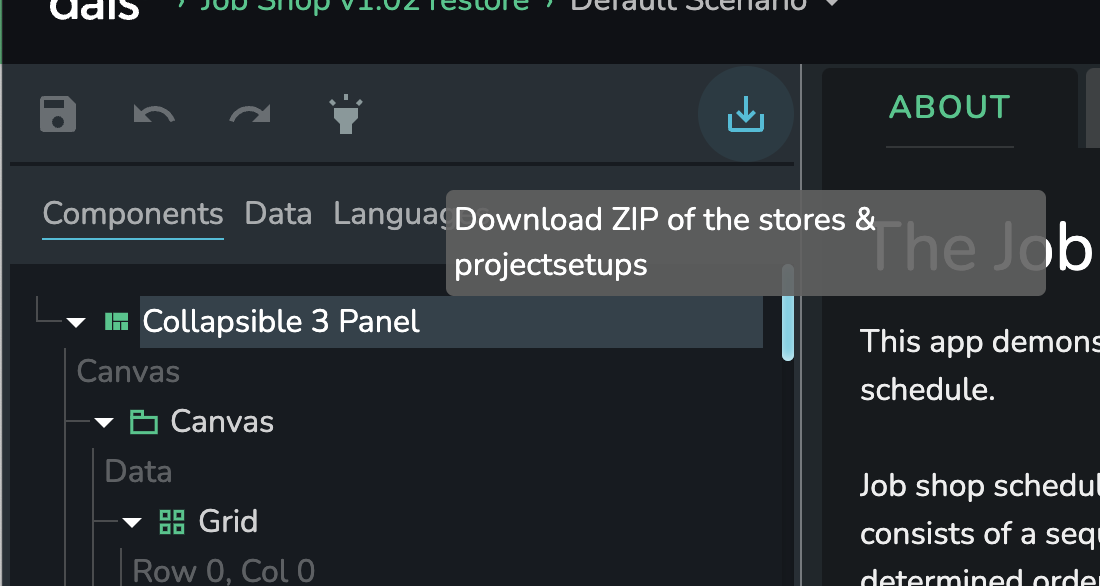
This will download a ZIP named {app-name}_{backup-datetime}.zip to your computer containing the main assets that define the app's UI. If needed, you can use these assets to restore this UI snapshot if needed.
Note: if you have any unsaved changes, you will need to save before you can download the backup.
You should do this regularly and consistently. If working in a team where multiple members are making changes to the UI, you should make a backup each time you load the app to make a change.
Before making a change to the UI
Saving your app & refreshing the page regularly is extremely important. If you haven't refreshed your app in some time (i.e. hitting the browser refresh button, or navigating back/forward in your browser session), then changes made by other team members may not be synced to your browser session.
Before you start to perform a change to the UI, ensure that you've refreshed your browser, so that changes made by other team members are reflected in your session.
Scheduling changes to the UI
It's important that multiple team members do not make changes to the UI concurrently. Even with the above precautions in place, it's very likely that you will overwrite each others changes if you both make changes at the same time.
The easiest way to do this is to book time with your team members where you can be sure you are the only one actively making changes to your app.
Making changes via the App Config Admin panel
Making changes to the App Config JSON via the Admin panel is discouraged, but sometimes necessary.
In these cases, the above statements still hold true:
- You must ensure that you refresh the page before you make a change, and save immediately after.
- You must ensure that you are not making changes at the same time as another member is making changes - either via App Builder or the
App Configpanel.