Download JSON on Data Change
Reference Guide
Use this component to make a request to an endpoint whenever a data source changes in your data store. For example, you might want to make a request to your backend whenever the user changes a drop-down. It is an invisible component (i.e. it doesn't render anything on the page). However, it is only active if the component is displayed on the page (i.e. if this component is hidden via a ViewSwitcher, then it is not active)
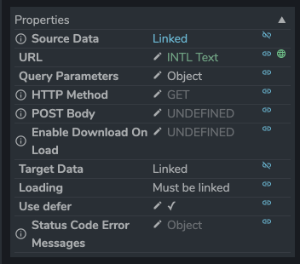
Properties
Source Data:
This acts as the data trigger. You will usually want to link this up to somewhere in your data store. This can be an object with nested properties. Whenever anything this object changes, a request will be made.
URL:
URL to make the request to.
Query Parameters:
If you're making a GET request, this object will be used to create the query parameters.
POST Body:
If you're making a POST request, this object will be used as the post body.
HTTP Method:
Whether to make a POST or GET request.
Enable Download On Load:
Whether to make a request when the component is first displayed (i.e. on page load)
Target Data:
Specify a link into your data store where this component will place the response of your request. i.e. the outputs of your request.
Loading:
Specify a link into your data store where this component will place a Boolean 'loading' value. Useful to display loading spinners.
Use defer:
Deprecated. Ignored.
Status Code Error Messages:
An object mapping status codes to error strings to display in the Toast if an error occurs. Useful if you want to display more informative messages to the user for common errors, i.e. a 404.